Folders
In this section of general settings you can set which special folders to show or hide and set some general settings for all folders.
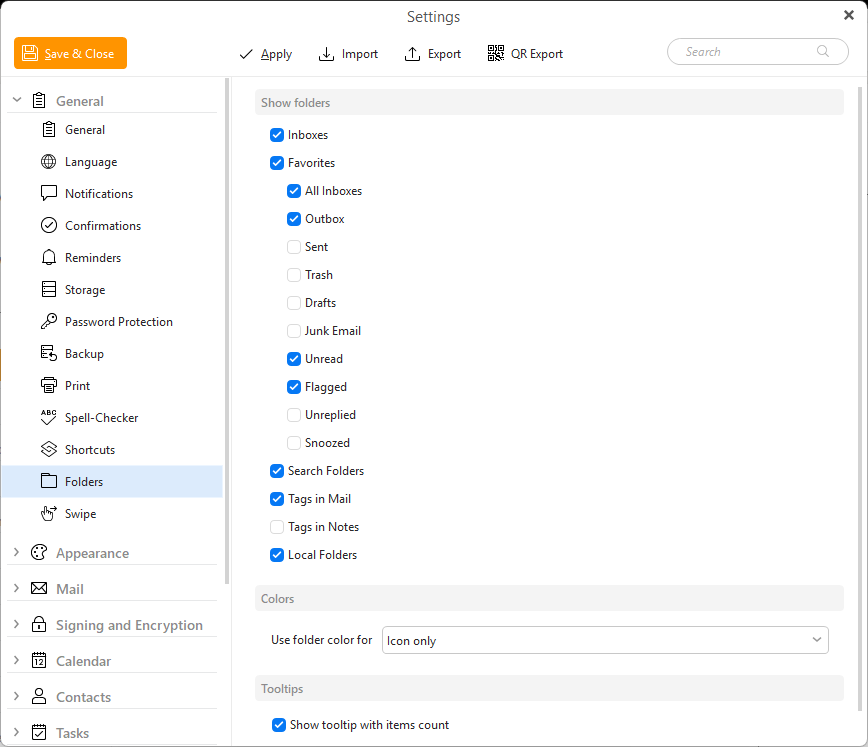
Show folders
- Inboxes - This seaction is for showing all accounts' Inbox folders, but separately.
- Favorites
- Section for special global folders and for pinning any folders manually
- All Inboxes
- Outbox
- Sent
- Trash
- Drafts
- Junk Mail
- Unread
- Flagged
- Unreplied
- Snoozed
- Search Folders
- Tags in Mail
- Tags in Notes
- Local Folders
You can change these even in the main program window via right-click in the folder list.
Colors
Use folder color for sets the behavior for colored folders
- Ignore folder color
- Icon only
- Icon and text (excluding calendars)
- Icon and text
Tooltips
Show tooltip with items count - this option enables a pop-up tooltip when you hover over a specific folder to show you the number of items in it.
Copyright ©
2025 eM Client s.r.o.
Thámova 18
Prague, 186 00
Czech Republic
[email protected]